Case study · Dimark · Design system
One design system for a family of industrial apps
Dimark’s apps for airport baggage-handling lines grew one by one, and every one of them looked different. I built a single design system for them from scratch: colours, type, sizes, components and states, documented in Figma so developers could build new screens from ready parts.
DiMS and BRS, two apps in Dimark’s family built on the same system
Company
Dimark
Timeline
May 2022 – Jan 2024
My role
UI/UX designer, the only designer on the team
Team
Team leader, front-end and back-end developers, tester
Scope
DiMS and other apps in Dimark’s product family
Method
Atomic design, built and documented in Figma
01 · Problem
Every app looked different
Before the design system, each app in Dimark’s family had its own look, and new screens were designed from zero every time. On the line, service engineers struggled with small buttons and low contrast on the tablet.
For the business
One consistent product family, faster delivery of new features, and a base ready for accessibility requirements.
For service engineers
Bigger touch targets for work in gloves and readable contrast on the tablet.
02 · Foundations
Colour, type and size, decided once
I started with the foundations and set them up as shared styles in Figma: an orange palette for the brand and key actions, a grey scale for text and surfaces, one typeface, and three component sizes. The same value meant the same thing in every app.
Main · Orange
700
500
400
300
200
Neutral · Grey
700
500
400
300
150
100
Type · Montserrat
Label
SemiBold 16 / 24
Task Planned
Body
Medium 16 / 24
Replacement of consumable parts
Table
Medium 14 / 20
18-05-2023 17:14 · 2:30 h
Button
SemiBold 12, tracking 2
FILTER
Sizes · 32 / 42 / 48 px
32 px
Small
42 px
Medium
48 px
Large · touch on the tablet
03 · Components
From atoms to pages
I built the library with atomic design, following Brad Frost’s five levels: atoms, molecules, organisms, templates and pages. Small parts came first, then I combined them into bigger ones. A change to a button or a status reached every screen that used it, in every app.
Atoms · Buttons
Filter
Default
Filter
Hover
Filter
Pressed
The smallest parts: buttons, checkboxes, icons and priority flags, each with Default, Hover and Pressed states.
Molecules · Status filter
Planned
In progress
Done
Failed
Expired
Hold
Atoms combined into working pieces: status filters, search, sorting and the planner’s week switch.
Organisms · Task rows in the planner

Click the image to see it larger.
Templates · The planner grid

The layout without real data: days, hours and team lanes, ready to be filled with tasks.
Pages · The planner in use

The same template with real tasks, statuses and the team’s to-do list. This is the screen service engineers use every day. Names are blurred.
04 · States & colour
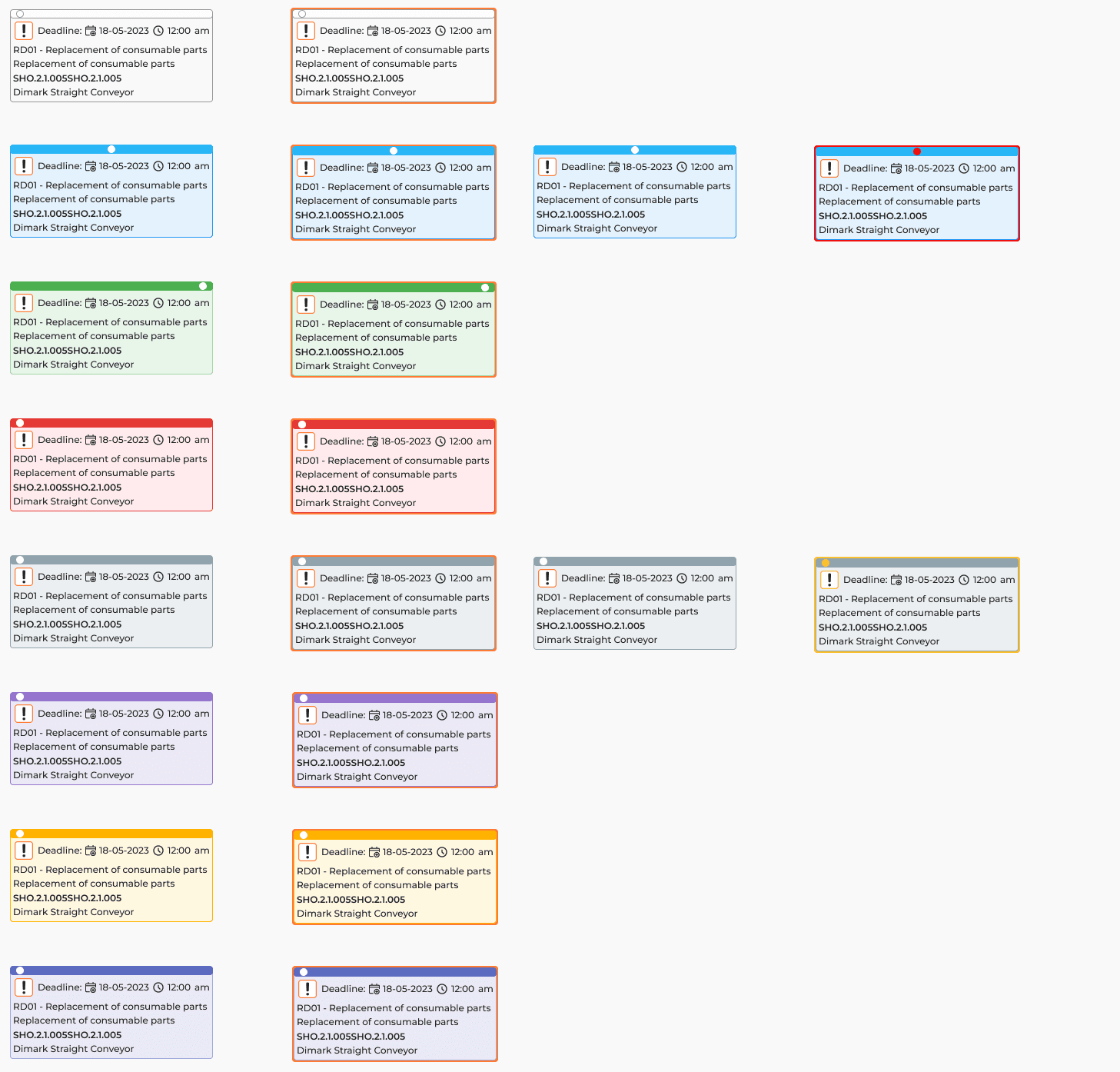
Six statuses, each with a colour and a name
A task in the planner moves through six statuses. Each one has its own colour, and the colour never works alone: the status name is always shown next to it. Components also come in variants such as Default, List and Pressed, and some, like the planner’s day buttons, in a light and a dark version.
Planned
In progress
Done
Failed
Expired
Hold
Task cards · every status, Default and Pressed
05 · Accessibility
Designed for work on the line
Accessibility was part of the system from the start, not a check at the end. I also explained the rules to the team, so they stayed in place when new screens were built.
Work in gloves
→ Touch targets of at least 48 px, main actions at the bottom of the screen
Low contrast on the tablet
→ A palette checked against WCAG AA
Statuses told apart by colour
→ Colour plus the status name, never colour alone
06 · Handoff
New screens from documented parts
Every component was documented in Figma with its sizes, variants and states. Developers built new screens from these parts instead of waiting for each screen to be designed from zero.
07 · Outcome
What the system changed
One product family
→ DiMS and Dimark’s other apps share one set of components
New screens
→ Built from documented components, not from zero
Accessibility
→ A base ready for WCAG requirements